
Step by step: Set up chart of accounts
1. Go to chart of accounts settings
- Go to Reconciliation under Settings & Admin in the menu on the left.
- Select the Chart of accounts settings tab at the top of the page.
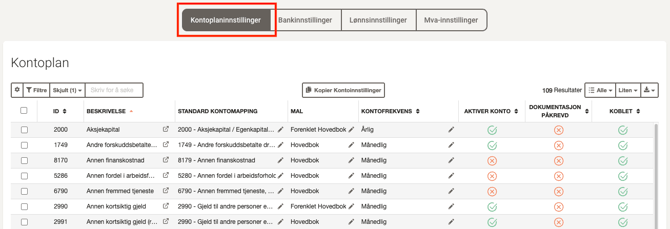
💡 Only accounts with transactions from the accounting system are shown in Accountflow.
2. Use filters if needed
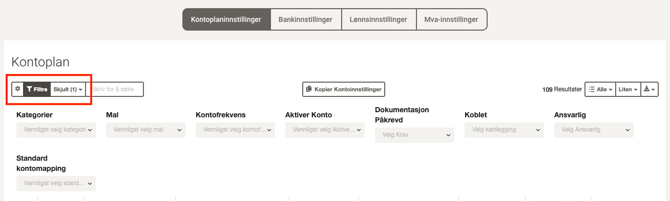
- Click on Filters to display accounts based on category, template, account frequency, assigned user, etc.
- Use Hidden columns to adjust which columns are displayed in the overview.
- Click on the gear icon (sometimes displayed as Reset settings) to reset search and filters.
3. Edit values in chart of accounts
- Click on the pencil icon in the different columns to edit values directly in the table.
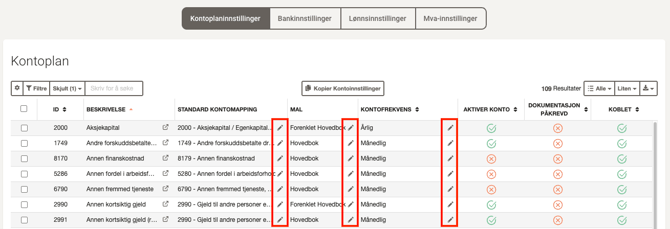
💡 Accounts with semi-annual frequency are only shown in periods 6 and 12 – useful to reduce the number of checks in other periods.
4. Change multiple accounts at once
- Check the desired accounts in the overview.
- A menu will appear at the top of the page with all fields available for editing.
- Make the desired changes and click Save.
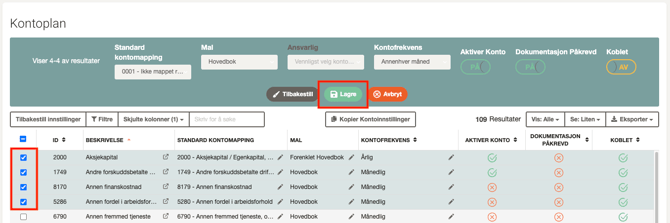
💡 Practical when you need to assign the same template or responsible user to many accounts at once.
Useful functions
At the top of the page, you will also find:
- Copy company settings – copies setup to another company.
- Export – saves the chart of accounts as PDF, CSV, or Excel.
- Show/View – adjusts number of rows and font size in the view.
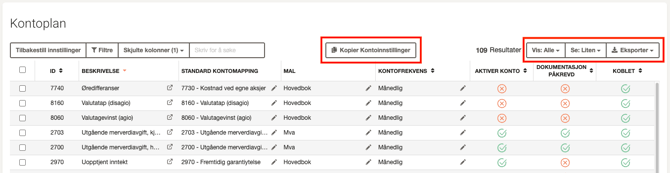
Columns – overview
| Column | Description |
| ID | Account ID from the accounting system. |
| Description | The name of the account. |
| Standard mapping | The SAF-T code the account is mapped to. Use the pencil icon to edit. |
| Template | The template the account is set to. |
| Assignee | The user responsible for reconciling the account. |
| Frequency | How often the account should be reconciled (e.g. monthly, quarterly, semi-annual). |
| Enable account | Angir om kontoen er aktivert for avstemming. |
| Require documents | Requires documentation (comment or attachment) for approval. |
| Mapped | Shows whether the account is linked to an account in Accountflow. |
Buttons and icons – overview
| Button/icon | Description |
 |
Sorts the list by column value. |
 |
Edits the value of the field. |
 |
Opens the account at transaction level. |